Practice Player vs Anytune: an Anytune alternative for iPhone
If your practice playlist lives in Apple Music, Practice Player's the easy pick. Slow it down, loop the hard part, done. If you're after EQ, isolating an instrument, lyrics, or practicing on a Mac or Android, honestly, go Anytune. Here's everything side by side.
Side by side
Anytune for iPhone and iPad comes as a free app with paid packs, or as Anytune Pro and Anytune Pro+. The table compares the iPhone apps unless a cell says otherwise.
| Feature | Practice Player | Anytune |
|---|---|---|
| Runs on | iPhone and iPad. The App Store also lists it for Macs with Apple silicon. | iPhone, iPad and Apple Watch (the watch app is a $4.99 add-on). There's also a separate Mac app and an Android app. |
| Price (US) | Free to download. The free version holds 15 songs, up to 7 points each. Unlock Everything is a one-time $11.99. The "Support the developer" subscription, $4.99 a year, also unlocks everything while it's active. | A free app with paid packs from $1.99 to $4.99, or Anytune Pro or Anytune Pro+ for $14.99 each. The Mac app is $34.99, with a 30-day free trial from anytune.app. |
| Apple Music subscription songs | Speed and loops work, streamed or downloaded. Pitch and pan don't. | Anytune says it can't play Apple Music subscription songs. Songs you own are fine. The Android app can slow down Spotify and Apple Music streams. |
| Speed | 0.33x to 2x out of the box. Min Speed goes down to 0.2x and Max Speed up to 5x. | Down to 0.05x without changing the pitch. |
| Pitch | Two octaves up or down, in semitones or cents, on a file the app can read. | 24 semitones up or down. The Android listing mentions fine-tuning by cents. |
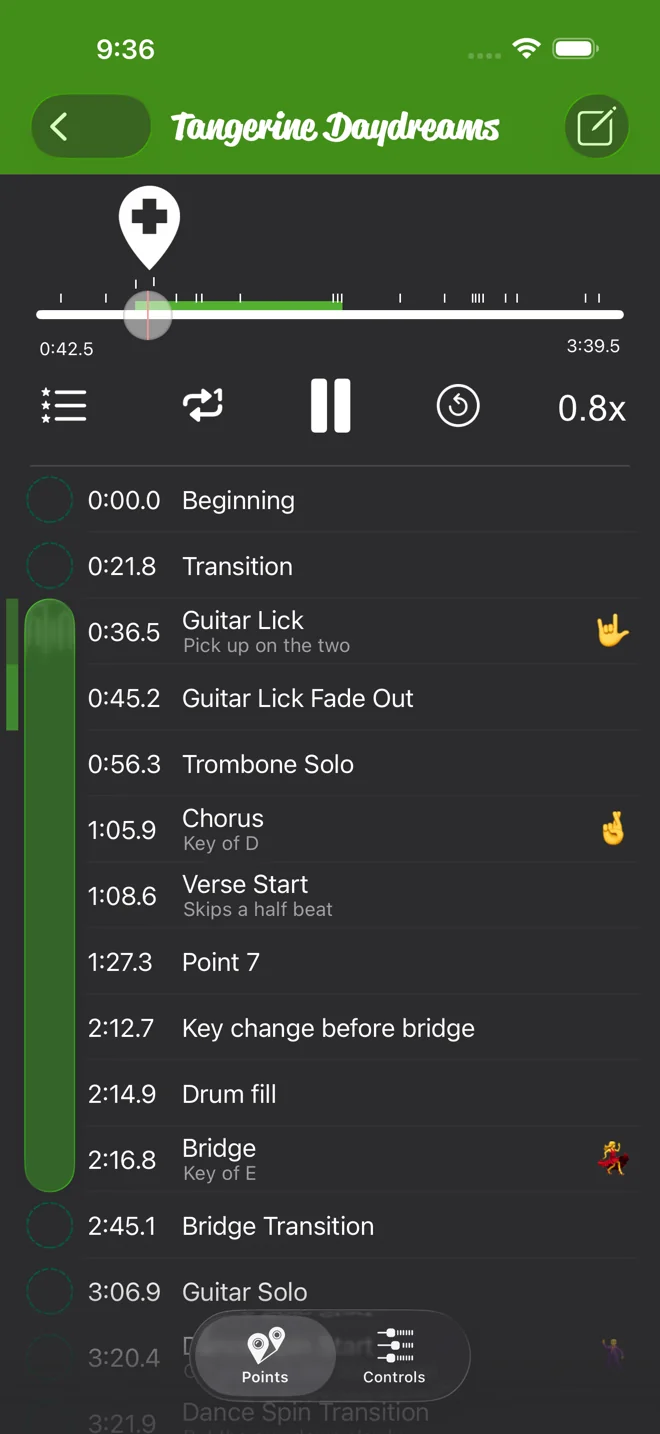
| Marking sections | Points with a name, a note and a status icon. Loop between any two. Move Point drags a point or nudges it a tenth of a second at a time. | Marks and loops, advanced looping, autoloop between marks, Play Next for a mark, and the Step-it-Up loop interval trainer. Its Android listing mentions marks you can label, color and nudge. |
| Recording | Record a take, then slow it down and loop it like any other song. | Record and analyze your performance. |
| Count-in | Clicks at the song's BPM, scaled to your speed. | Audible and visual count-in. |
| Shaping the sound | Pan, on a file the app can read. | Gain and pan, FineTouch EQ, ReFrame audio isolation and LiveMix. |
| Lyrics and tabs | No. | Text lyrics or tabs that scroll with the music. |
| Practice tracking | Practice time per song and per point, daily goals and streaks. | Not in its App Store feature list. |
| Looks | Themes. | Custom skins, and a light or dark look. |
| App languages | 25. The App Store lists 24 because it counts Portuguese once. | 8: English, French, German, Italian, Japanese, Korean, Portuguese and Spanish. |
| Last update | Version 3.0.1 on 2026-10-04. | iPhone and iPad: version 4.9.5 on 2026-08-19. Mac: version 2.7.4 on 2026-09-14. Android: 2026-04-09. |
When Anytune is the better pick
Pick Anytune if one of these matters to you. Practice Player doesn't do any of them.
- You want a Mac app of its own, or you practice on Android.
- You want to bring an instrument forward with EQ, or mute a part with ReFrame.
- You read lyrics or tabs while you play.
- You want a loop trainer. Anytune lists Step-it-Up on iPhone, and its Android Loop Trainer starts slow and speeds up.
- You need to go slower than 0.2x.
- You want to control it from an Apple Watch.
Anytune has been on the App Store since 2011 and has thousands of ratings. If it already does what you need, keep using it.
Switching from Anytune
Anytune calls them marks. Practice Player calls them points. There's no import for Anytune marks, so you set them again.
- Tap the add button and pick Apple Music for songs in your library, or Local Apps and Files for audio files in the Files app.
- Open the song and tap Points. Play to where the hard part starts and tap the + above the playhead. Do the same where it ends.
- Tap the first point and pick Set Start. Tap the second and pick Set End. Looping is on by default.
- Tap Controls and drag the speed slider left.
The loop guide walks through it step by step. If a point lands a hair late, move it instead of starting over. For Apple Music songs, this guide covers what works on a stream and what needs a download. Then the half-speed ladder guide shows how to bring a loop back up to tempo by hand.
Practice Player is free to download, with a paid upgrade for unlimited songs and points.
Anytune details checked on 2026-10-12 from its App Store listings, its website and its Google Play listing. Prices are US App Store prices on that day. Anytune is a trademark of Anytune Inc. This page is not affiliated with Anytune Inc.
Spotted something out of date? Email [email protected] and we'll fix it.