Which apps can slow down Apple Music songs, and which can't
Ten iPhone practice apps were checked against their own App Store pages and help sites. Five can slow down Apple Music songs. The other five say they can't play Apple Music subscription songs.
Ten apps, checked against their own listings
| App | Apple Music songs | Speed | Change key | Loops | Price |
|---|---|---|---|---|---|
| Practice Player | Yes, streamed or downloaded | 0.33x to 2x by default | Own files | Yes | Free, $11.99 one-time or $4.99 a year |
| Amazing Slow Downer | Yes, streaming | 0.25x to 2x | Own files | Yes | $14.99 |
| Transcribe+ | Yes, songs in your library | 0.25x to 2x | Not stated for Apple Music | Yes | Free, subscription or one-time unlock |
| Slowify | Yes | Up to 4x slower or faster with Pro | Not listed | Yes | Free, Pro $3.99 a month or $24.99 a year |
| Grooves | Yes, the whole catalog | 0.5x to 2x | Own files | Yes | $4.99 |
| Anytune | No (subscription songs) | Down to 0.05x | Own files | Yes | Free with paid packs, or Pro or Pro+ for $14.99 |
| Capo | No streaming | Yes | Own files | Yes | Free, Pro $19.99 a year |
| AudioStretch | No | -10x to 10x | Own files | Yes | $9.99 |
| Super Slow Downer | No streaming | 0.25x to 2x | Own files | Yes | $0.99 |
| Moises | No | Yes | Own files | Yes | Free, Premium from $5.99 a month |
Prices are from the US App Store. "Own files" means songs you have as files, like purchases or imports, not Apple Music subscription songs.
What the listings say, in their own words:
- Amazing Slow Downer added Apple Music streaming. Its listing says "Pitch change" and "Equalizer" are not available when playing Apple Music songs.
- Transcribe+ lets you adjust the tempo and add flags and loops to songs in your Apple Music library. It says some features are unavailable on Apple Music tracks because of DRM, and doesn't say which.
- Grooves changes the key only of "locally stored DRM-free songs".
- Anytune's listing says it "cannot play DRM-protected songs, including songs through subscription services like Apple Music." Songs you own are fine.
- Capo and Super Slow Downer work with songs you own, not Apple Music streaming. AudioStretch says Apple Music songs "cannot be loaded". Moises' help center says uploading an Apple Music song "won't work" because of DRM.
Why Apple Music songs stop at speed
Apple Music subscription songs are copy-protected (DRM). An app can't open the audio file. Practice Player asks Apple's own player to play the song faster or slower. That's how it changes the speed of an Apple Music song, even on a stream.
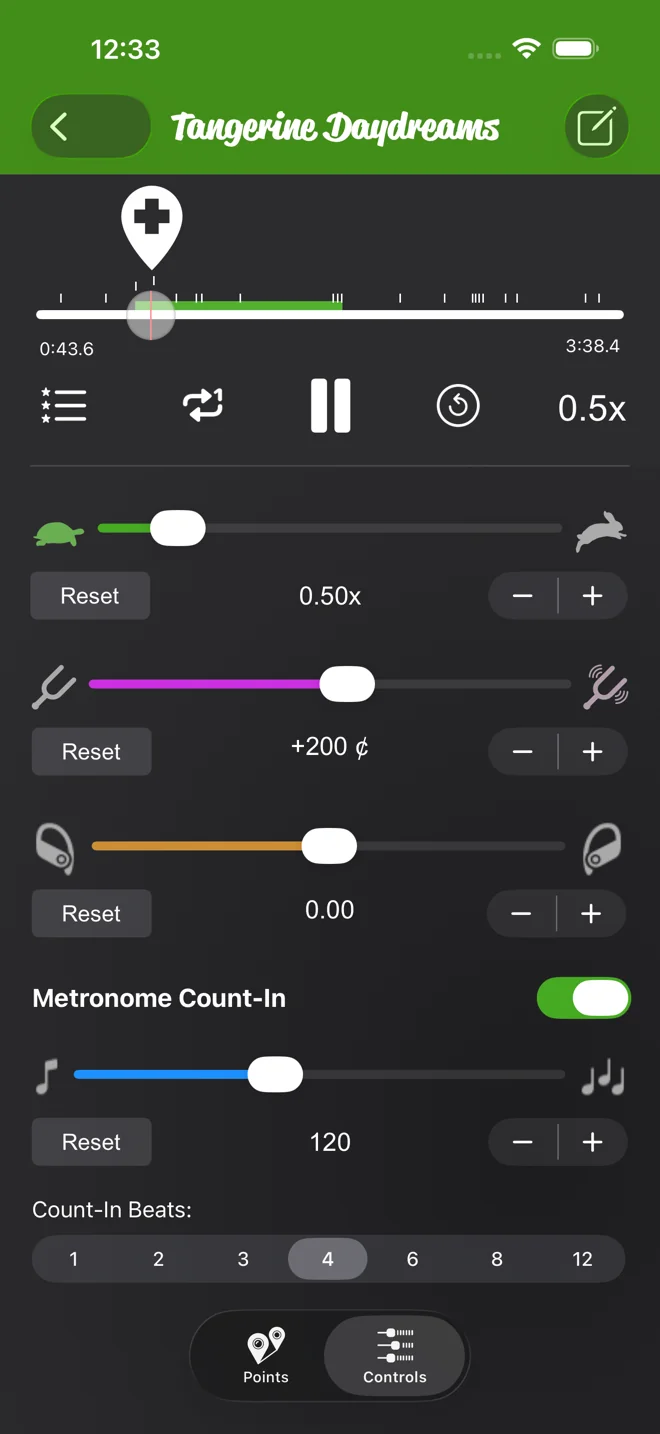
Pitch and pan are different. The app has to work on the sound itself, and a protected song doesn't allow that. In Practice Player the pitch and pan controls are dimmed on an Apple Music song, streamed or downloaded. Tap one and it explains.
Converter sites get around this by stripping the protection. That breaks Apple's terms, and you don't need it to slow a song down.
How to slow down an Apple Music song in Practice Player
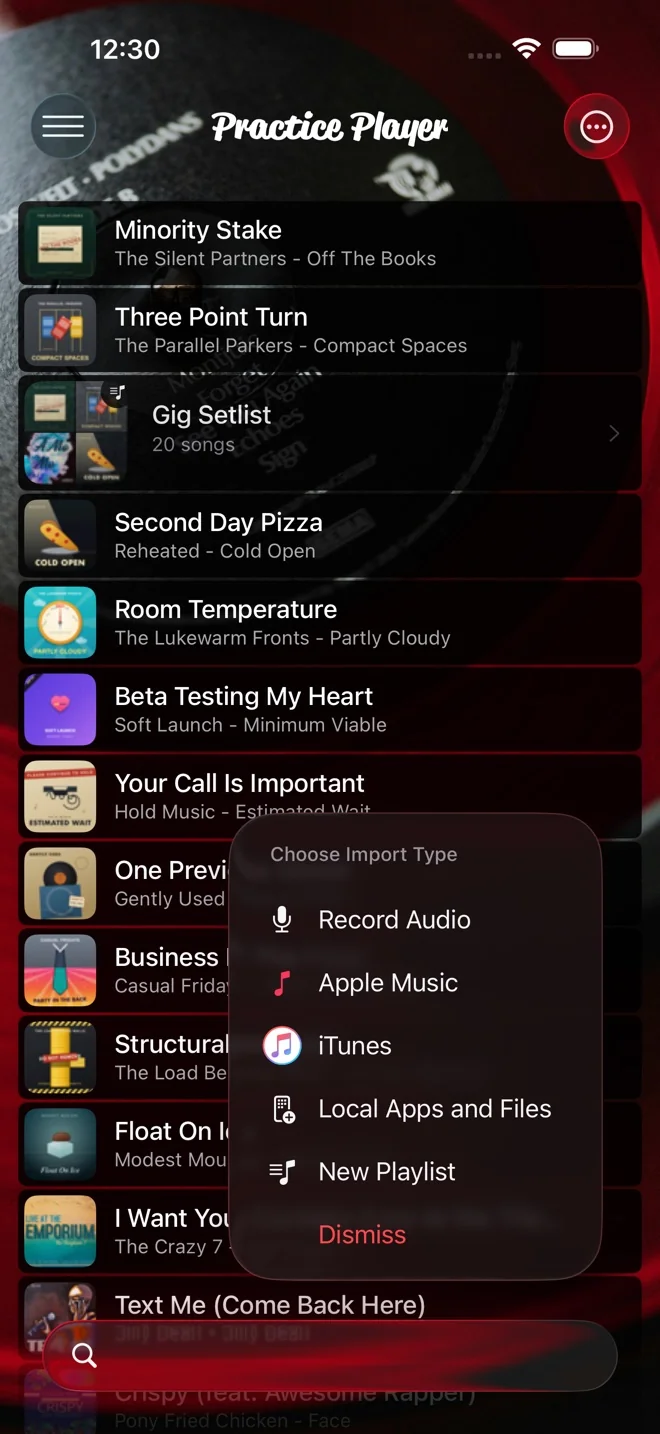
- Tap the add button, choose Apple Music, and search for the song. Tap it to add it.
- Open the song, tap Controls, and drag the speed slider left.
- Add two points around the hard part. Use Set Start on the first and Set End on the second, and it loops at the speed you picked.
The Apple Music guide has every step, including what the search results mean. The loop guide covers points and loops.
Questions people ask
Can I change the key of an Apple Music song?
No, not on an Apple Music subscription song. In Practice Player you need a file the app can read: a song you bought and downloaded to the phone, a file you imported, or one of your own recordings. Then the transpose guide works.
Does downloading the song for offline help?
No. A downloaded Apple Music song is still protected. Speed works, and pitch and pan stay dimmed. A song you bought from the iTunes Store and downloaded is different. That one is yours, so pitch works.
What about Spotify?
Practice Player can't play Spotify. Amazing Slow Downer's listing says Spotify cut off the access third-party apps needed to slow songs down on September 1, 2022.
Is Practice Player free?
The download is free. The free version holds 15 songs with up to 7 points each. A paid upgrade removes both limits.
Practice Player is free to download, with a paid upgrade for unlimited songs and points.
Checked on 2026-10-12.
Spotted something out of date? Email [email protected] and we'll fix it.