Practice Player 3.0.1
- Released
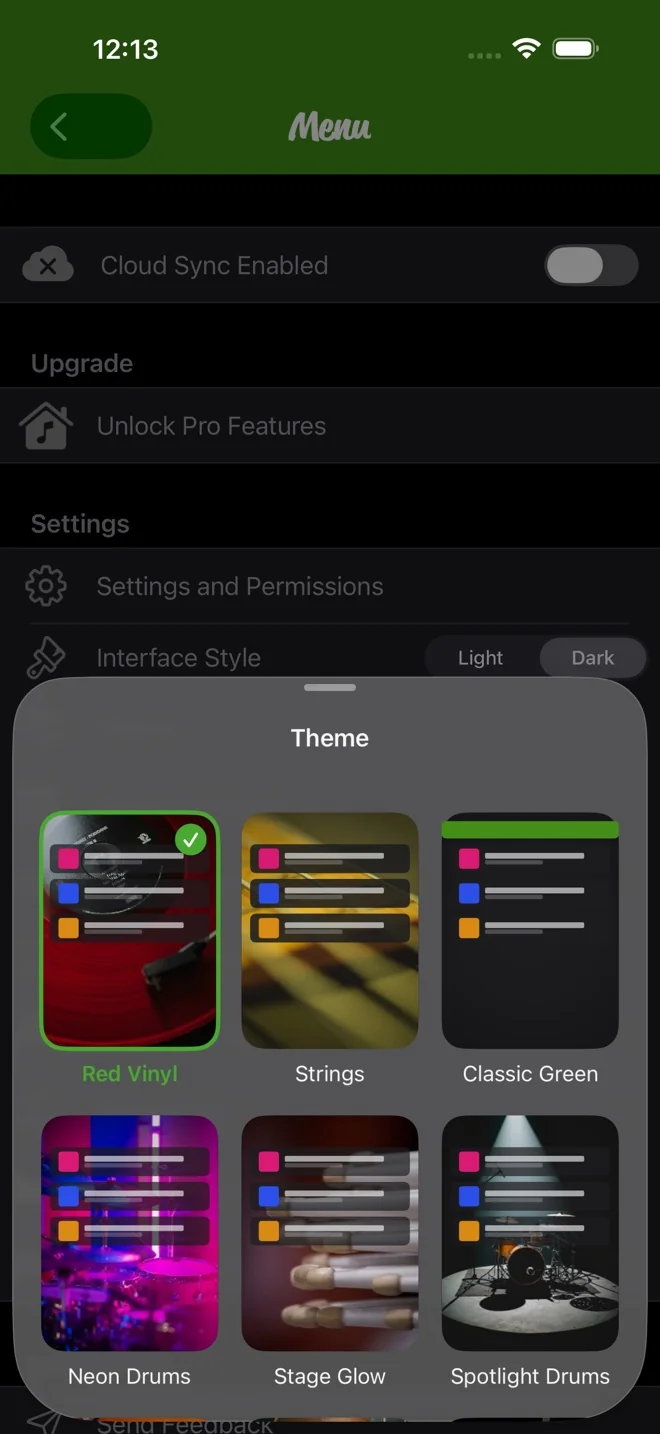
On iOS 26 you can pick from 17 photo themes for your song list.
iCloud sync is in beta. It keeps your songs, loops, notes and practice stats the same on all your devices.
Finding songs is faster too. Apple Music search keeps your results, and you can import several songs at once.
In this release
- Choose from 17 downloadable photo themes on iOS 26. How to use it
- iCloud sync (beta) keeps your songs, loops, notes and practice stats on every device.
- Apple Music search keeps your results. Select several songs and import them at once.
- For You suggests songs to practice, based on what you listen to in Apple Music.
- Add songs to a playlist straight from multi-select.
- Turn on Point Tap to jump to a practice point with one tap.
- Keyboard shortcuts on iPad and Mac: Space plays or pauses, the arrow keys move between points, and Command-F searches.
- You can turn off Streak Celebrations in Settings.
- The upgrade screen is simpler.
- Opt in to deal alerts to hear when a sale starts.
- Songs that had not finished syncing to iCloud are no longer removed.
- The same Apple Music song added on two devices now becomes one song, with your latest settings.
- A loop's end point stays put when you reopen a song.
- Fixed a hang while saving, and several crashes.
- A quick double tap on record no longer trips up recording.
- Fixed text in many languages.
Download
Practice Player is free to download, with a paid upgrade for unlimited songs and points.